Gradespace Assistant
Add-on for every kitv0.3.0A friendly assistant that answers your visitors, day and night.
It answers questions about your business from your own website and notes, however they’re asked, never makes up prices, and hands people over to booking, WhatsApp or your contact form. It uses your own Anthropic or OpenAI key, with a monthly cap you set.
from£59one-time · incl. VAT where applicable
Before you buy: Assistant needs Gradespace Core 0.9.1 or later with any Gradespace kit, and an Anthropic or OpenAI account in your business’s name, which bills you directly for what it uses. What you need
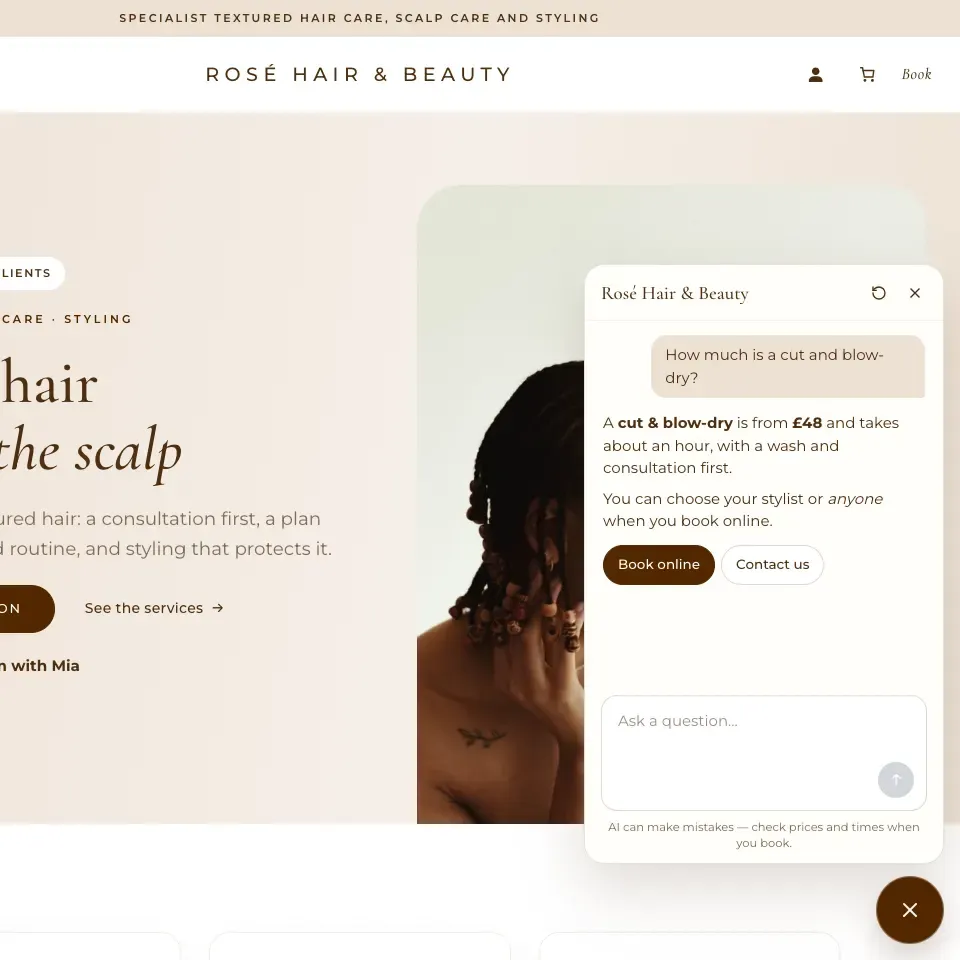
Ask a sample salon a question: the Salon kit’s Rosé Hair & Beauty in the Atelier design, with the assistant on. Demo resets every night.
- One-time price
- Lifetime updates
- Works with every kit
- 14-day money-back
What it does
A small chat button on your website. Visitors ask about your business and get a short, friendly answer in a few seconds, from what you’ve already told your website.
Answers from your own website and notes
Your published pages and posts, your business details (name, address, phone, email, opening hours and closures) and the notes and questions and answers you write for it. Your notes always win over what a page says. It doesn’t search the internet.
Understands questions however they’re asked
“How much is a cut and blow-dry?”, “Are you open on Saturday?”, “Is there parking?”: visitors ask in their own words and get a short, friendly answer in plain British English, with a link to the page it came from.
Hands over to booking, WhatsApp or the contact form
Under its answers, and whenever it doesn’t know, it shows your buttons to book online, message you on WhatsApp or get in touch.
Anthropic or OpenAI, with your own key
Choose Anthropic (Claude) or OpenAI (ChatGPT) and paste a key from your business’s own account. The cheapest model is chosen to start with (Claude Haiku or GPT-5 nano), and you can change the service or the model at any time; each service keeps its own key.
A monthly spending cap
Set a cap in pounds (£10 to start with, as low as £1) and a limit on messages per visitor per day. Settings → Assistant shows this month’s spending against the cap; when it’s reached, visitors are offered your hand-over buttons instead.
Never invents prices, and no advice it shouldn’t give
If the answer isn’t in what it knows, it says so. It never makes up prices, times or policies, gives no medical, legal or financial advice (for a health question it suggests booking a consultation), doesn’t ask for personal details and only talks about your business.
Try it before visitors do
Assistant → Try it shows the chat as visitors see it, even before you switch it on, with the passages that were sent with each question. Nothing shows on your website until you switch it on.
Photos, if you want them
Switch on photos and visitors can add up to two pictures to a question, from the + beside the message box. They’re sent to the AI company only to answer and never kept, and the assistant describes what it sees without diagnosing anything or identifying anyone. Off until you switch it on.
Works with every kit and design
A ✦ chat button and a panel with your logo, your name and your fonts; its colours follow your design and palette. It works with a keyboard and screen readers, fills the screen on phones, and stays out of your dashboard, account, basket and checkout pages and the staff and student portals.
Privacy: no cookies. The chat stays in the visitor’s browser tab and is gone when they close it, and conversations are kept on your website only if you switch that on (for 30 days, messages only). The AI company gets the question and the parts of your website that help answer it, never who asked. Your AI keys stay on your server, encrypted.
Before you buy
What you need
Assistant is an add-on: it works on a website built with any Gradespace kit, with your own AI account.
Gradespace Core
The free framework every kit runs on, version 0.9.1 or later.
Any Gradespace kit
Every kit and every design. The assistant takes its colours and fonts from your design and palette.
See the kitsAn Anthropic or OpenAI account
In your business’s own name, with a payment card, to make an AI key (console.anthropic.com or platform.openai.com). The company you choose bills you directly for what the assistant uses: typically a few pence per conversation on the cheapest model.
Your website on https://
The chat only talks to your own website, which sends the question to the AI company.
Prices
One payment, a lifetime licence and every future update. The AI company you choose bills you separately for what the assistant uses, up to the monthly cap you set.
Starter
£59one-time
incl. VAT where applicable · 1 live website · lifetime updates
- A chat button on every page of your website, full screen on phones
- Answers from your pages, business details, opening hours and your own notes and Q&A
- Never invents prices, times or policies, and gives no medical, legal or financial advice
- Booking, WhatsApp and contact buttons when it can’t help
- Anthropic (Claude) or OpenAI (ChatGPT) with your own key; the cheapest model to start with
- A monthly spending cap and a limit on messages per visitor
- No cookies; conversations kept only if you switch that on
- Try it yourself before visitors see it
- Lifetime updates
Agency
£159one-time
incl. VAT where applicable · 5 live websites · lifetime updates
- Everything in Starter
- 5 live websites on one licence
Already have an Assistant Starter licence? Move it to Agency from your licences page and pay only the difference. Read the manual.
Questions
Does it work without an AI key?
What does it cost to run?
Can I change the AI model?
What won’t it do?
Where does the data go?
Which kits does it work with?
What does the licence do?
Refunds
Something else? Get in touch, or read the Gradespace Assistant manual.