
OpenVision for Mac

Turn your phones and a Mac into a live studio

Connect what you already have, switch between shots, and send the show wherever it needs to go.
Download free
  • One payment
  • Updates for life
  • 14-day refund
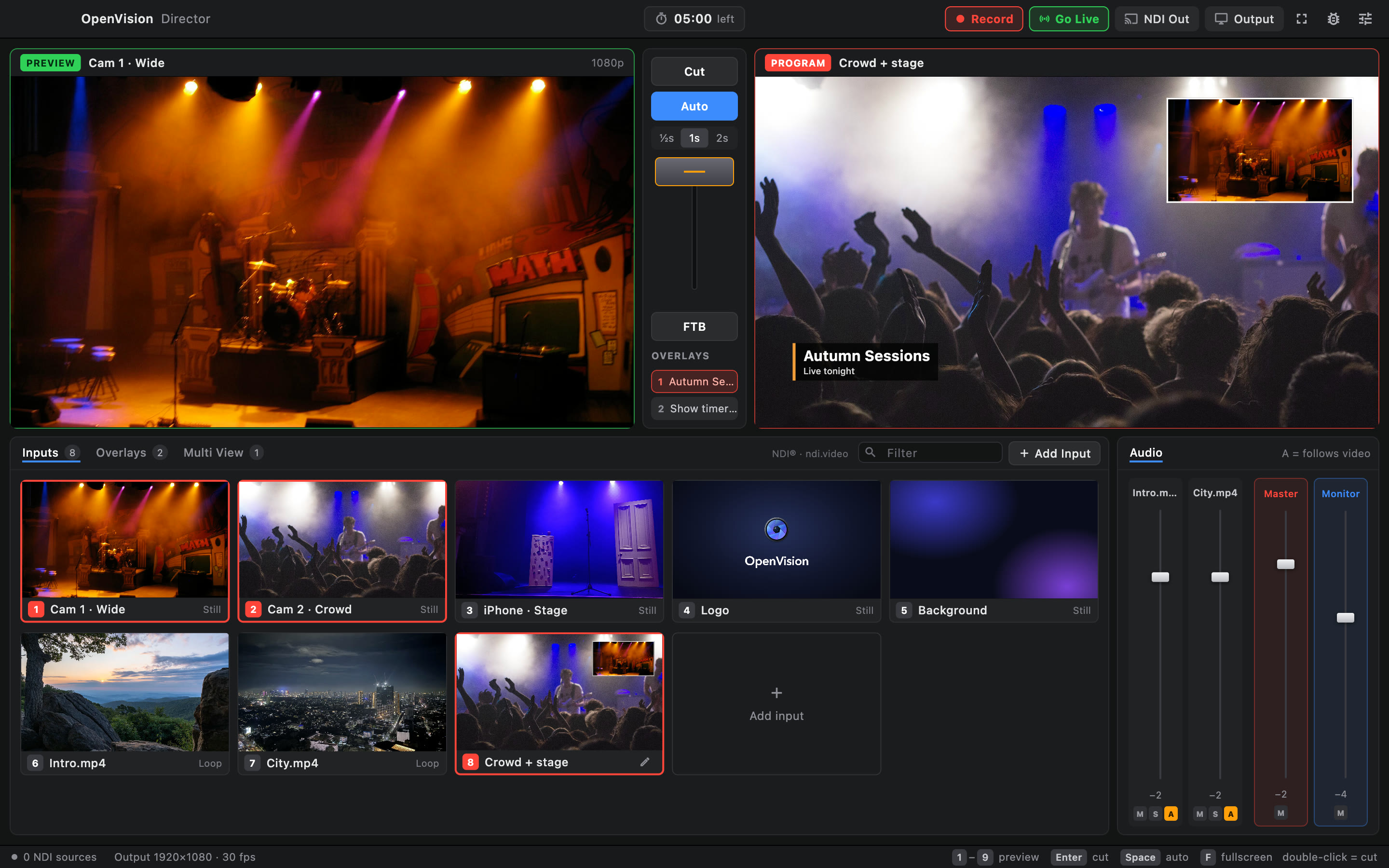
The OpenVision Director with cameras, a Multi View and an audio mixer

From camera to audience

Bring in

  • Phones with OV Cam
  • NDI® sources
  • Capture devices
  • Video loops and photos

Switch in the Director

Send out

  • Record Program and inputs
  • Stream over RTMP
  • NDI® Out
  • Second display

Apps for your phones and iPad

OV Cam

The free camera app for iPhone and Android. It sends live video from each phone to OpenVision over your Wi-Fi.

Download on the App StoreGet it on Google Play

OpenVision Director for iPad

Run the show from an iPad, with your phones as cameras.

Download on the App Store

Apple, iPhone and iPad are trademarks of Apple Inc. App Store is a service mark of Apple Inc. Google Play and the Google Play logo are trademarks of Google LLC.

Everything for the show, in one window

  • Switch live

    Preview and Program, with cut, auto and T-bar transitions.

  • Any source

    NDI®, capture devices, video on loop, photos, and phones through OV Cam.

  • Record and stream

    Record Program and up to 5 separate inputs. Go live over RTMP.

Start free. Pay once if you need more.

Free

£0

  • 4 inputs, 2 overlays and 2 Multi Views
  • Record Program
  • Stream at 720p
  • Studio layout

Pro

One payment

£79

One payment, no subscription

  • Unlimited inputs, overlays and Multi Views
  • Record Program plus 5 separate inputs
  • Stream at 1080p
  • Studio, macOS Native and Console layouts
  • One key for 2 Macs
  • Updates for life

What’s new

1.2.0

November 2026

Audio level meters.

  • A Program meter beside the Program picture shows what goes to the recording, stream and outputs
  • Level meters on every input
  • Wider mixer meters with left and right, a dB scale, peak hold and a CLIP warning
  • Master and Monitor meters now measure the real sound

Questions

Is it really a one-off payment?
Yes. You pay once for Pro. There are no renewals or subscriptions.
Do I need the internet during a show?
No. Cameras and sources connect over your own network, and Pro keeps working offline once it has been activated. You only need the internet to stream.
Does my video go through Gradespace?
No. Video stays on your devices and local network unless you choose to go live, and then it goes to the streaming service you chose. Recordings stay on your Mac.
Can I bring in guests from Teams or Zoom?
Yes. Teams, and Zoom Rooms, can send each person on a call to your network as NDI, and OpenVision adds them as inputs. Our guide below shows how.
Can I move Pro to a new Mac?
Yes. One key covers 2 Macs. Remove an old Mac from your key and activate the new one.
Do I get updates?
Yes. Every future version is included for life, with nothing to renew.
Refunds
Ask within 14 days of buying and we will refund you in full, and the key is then switched off.

Guests on a call? See bring in Teams or Zoom guests over NDI. NDI® is a registered trademark of Vizrt NDI AB. OpenVision is not a product of, or endorsed by, Vizrt NDI AB. See the terms and privacy policy.