Running your website
Students, tutors and classes
How classes, subjects, tutors and students are linked to TargetGrade, the People and classes screen, and suspending a student in TargetGrade.
On this page
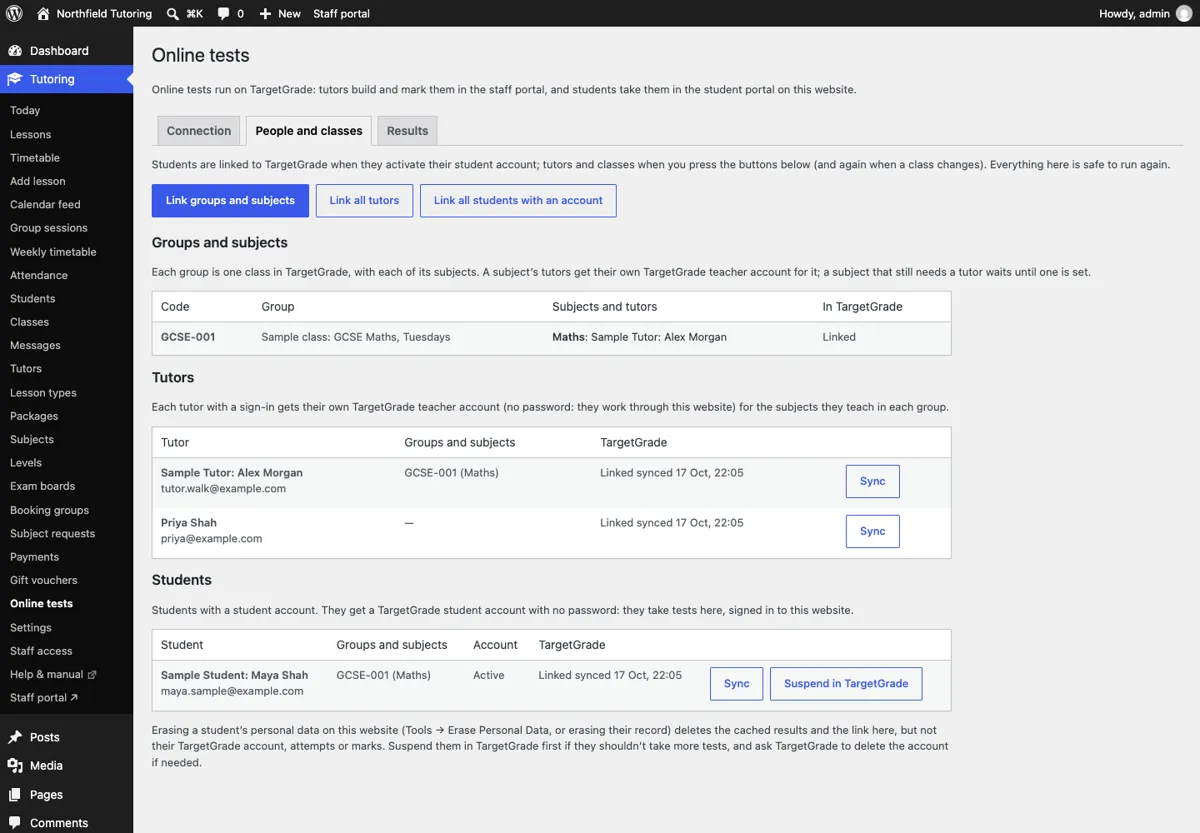
Go to Online tests → People and classes. Administrators and the Office role can use this screen.
How things are linked
- Groups. Each group (for example GCSE-003) becomes one TargetGrade class with the same code, in the school's current year.
- Subjects. Each subject the group teaches becomes a TargetGrade subject with the same name. A subject for the whole group is TargetGrade's "General".
- Tutors. Each tutor whose profile has a sign-in gets their own TargetGrade teacher account. In each group they're given only the subjects they teach there. They don't get a TargetGrade password: they work through your website.
- Subjects that need a tutor. A subject with no tutor yet has no TargetGrade teacher. The screen shows it as Needs a tutor, and it's linked as soon as you choose its tutor.
- Students. A student is linked when they activate their student account, or when they first open Tests. They get a TargetGrade student account with no password, in their groups. In each group TargetGrade enrols them for exactly the subjects they take there, so they see and can start only those subjects' tests (your website checks too). Their link is updated whenever they join or leave a group, change subjects, or have a request for another subject approved.
Sites linked before Tutor 0.4.0
Nothing changes for them. Each class keeps its TargetGrade class and subject, and nothing is made twice. Once Tutor 0.4.0 turns the class into a group with that one subject, Assess carries on with the same links.
The buttons
- Link groups and subjects: do this first, and again after adding groups or subjects.
- Link all tutors: after adding tutors or changing who teaches a class (the website also does this by itself when a class is saved).
- Link all students with an account: catches up anyone who isn't linked yet.
- Sync on a row links just that tutor or student again.
Every button is safe to press again.
Each row says Linked, Not linked, Needs review or Problem, with what went wrong.
Students who already have a TargetGrade account
Before making a TargetGrade account for a student, the website looks in your TargetGrade school for a student with the same email address (capitals don't matter). This matters when your centre already used TargetGrade, for example when moving from Edunoetic.
- One active student with that email: the website links to that account and makes nothing new. The student keeps their past tests and marks, and their TargetGrade classes are set to their groups and subjects here. The row says Linked to an existing TargetGrade account, and the change is recorded in Site stats → Security.
- More than one, or one that's suspended: the website doesn't guess. The row says Needs review and lists each account it found, with Link to this account. Choose the right one. A suspended account is reactivated when you link it.
- None: a new TargetGrade student account is made, as usual.
If the email belongs to someone in TargetGrade who isn't a student (a teacher, perhaps at another centre), the website tries a variant of the same inbox once (for example sam+gs1a2b3c@example.com). If that fails too, change the email on the student's account.
Suspending a student in TargetGrade
Suspend in TargetGrade stops a student taking tests. Their attempts and marks stay in TargetGrade. Reactivate in TargetGrade undoes it.
When a student's account is suspended or closed in Tutor, they're suspended in TargetGrade too, and reactivating the account reactivates them. A student who leaves every class no longer sees any class's tests.