Running your website
Sending and collection
Sending your own lots or having them collected, how outside sellers send, and when a buyer says it arrived.
On this page
Your own lots
-
Delivery or collection: your invoice shows the delivery line from Marketplace → Settings → Marketplace → Delivery line on your own lots. Buyers choose postage or collection at checkout (WooCommerce's Local pickup, made by the wizard's Shop settings).
-
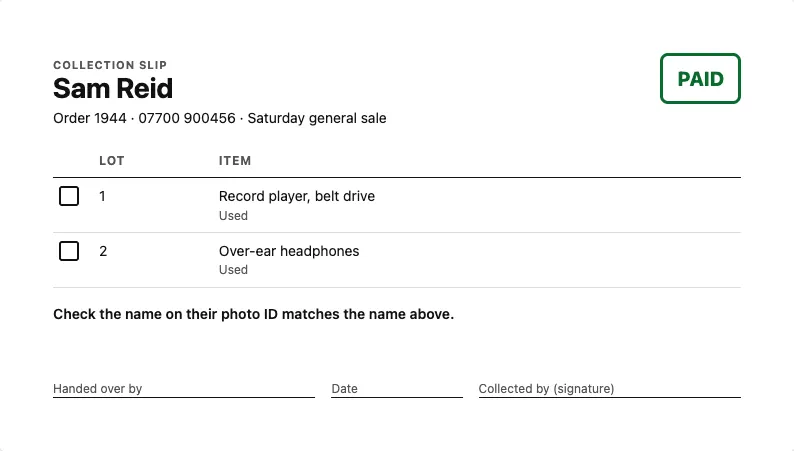
Collection slips: print one from the order screen's Collection slip button, or every winner's slip for a finished sale with Print collection slips on the sale (Marketplace → Sales and lots). Each shows the buyer's name and phone, Paid or Not paid: don't hand over in large letters, each lot with a box to tick, and lines for who handed it over, the date and the buyer's signature. Check the buyer's photo ID matches the name.
-
Mark it sent or collected from the order screen (WooCommerce → Orders → the order → Sending and payout), with a tracking number if there is one. The buyer is emailed that it's on its way.
-
Royal Mail Click & Drop: put your key in Marketplace → Settings and send an order into your Click & Drop account from the same box. See Labels and Click & Drop.
Outside sellers' items (Pro)
- The seller sees the order in Selling → Orders and payouts, with a Send by date, prints an address label (or a Click & Drop label) and marks it sent with the tracking number.
- The buyer can press Yes, it arrived on their order page. The seller is paid then, or a number of days after sending (5 unless you change it), whichever comes first. A seller isn't paid while a case is open on the item.
- Postage the seller charges goes to them in full; commission is only taken from the price.