User manual
Gradespace Charity: the manual
What the Charity kit does for a charity or community group, what comes with Starter and with Pro, and every chapter of this manual in reading order.
On this page
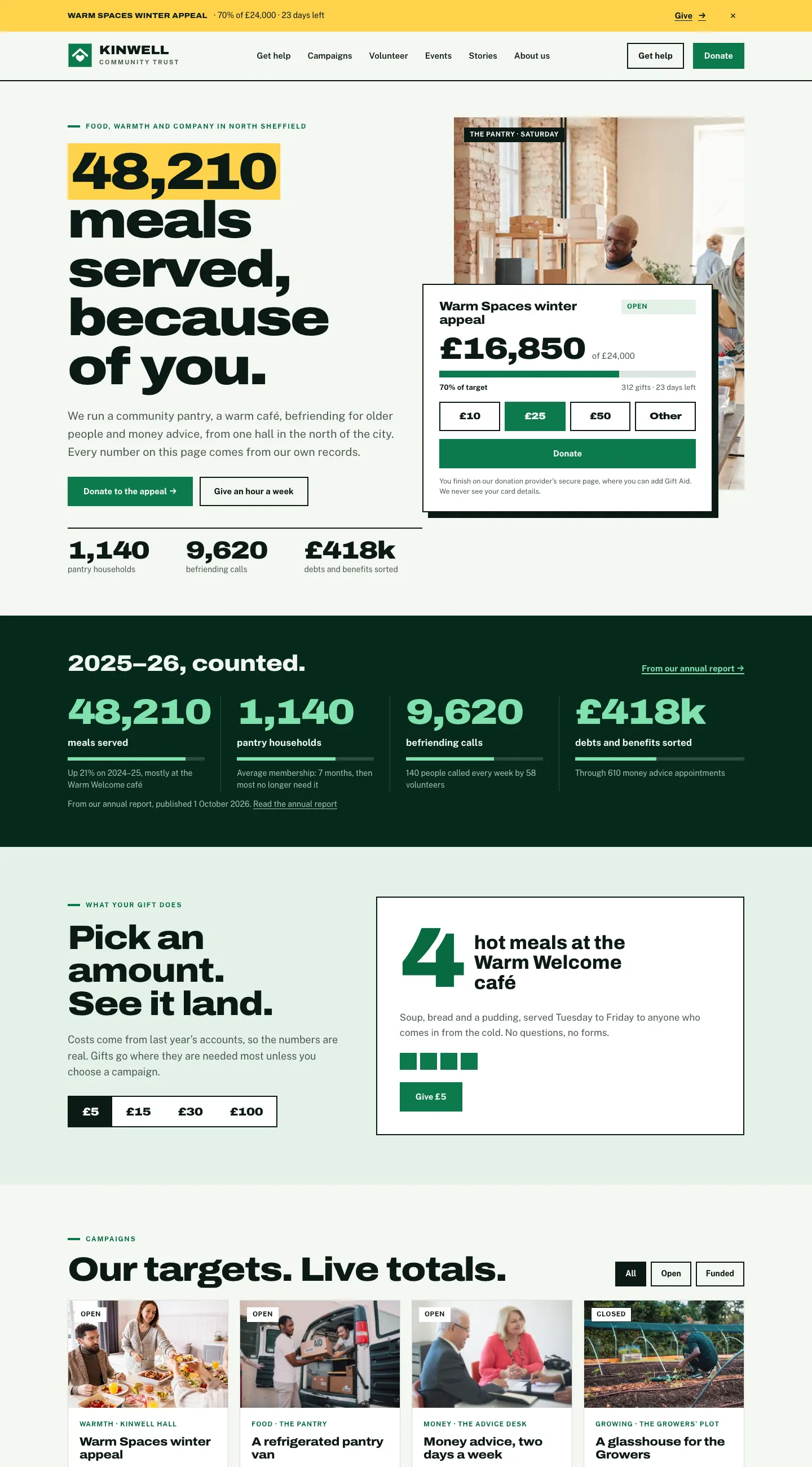
The Gradespace Charity kit turns a WordPress website into the online home of a charity, community group or community interest company. It shows your campaigns with live totals and progress bars, sends donors to the donation provider you already use, takes volunteer sign-ups and shift bookings, lists your events, places and services, and publishes impact stories and annual report figures. Your registered charity and company numbers appear in every footer.
This manual is for the people who run the website day to day: owners, staff, trustees and volunteers. You don't need any technical knowledge.
All the examples come from the public demo, the made-up Kinwell Community Trust in Sheffield, at charity.gskits.co.uk. You can try every screen there yourself: click Look around the admin in the demo bar to see the staff side, or Look around a volunteer's shifts to see one sample volunteer's own My shifts page.
What the kit does
- Campaigns with a target, the amount raised, a progress bar, days left, milestones, where the money goes, questions, recent gifts and dated updates.
- Donations through your own provider: JustGiving, Enthuse, CAF Donate, PayPal Giving Fund, Stripe Payment Links or another provider. People give, and add Gift Aid, on the provider's secure page. Your website never sees or stores card or bank details.
- Volunteers: an online sign-up form with roles, skills and when people are free. Each sign-up becomes a private record that you review.
- Shifts and a rota (Pro): places, waiting lists, reminders and a My shifts page for each volunteer.
- Events with sign-ups on the website and a calendar people can subscribe to.
- Places and services: your hubs, shops and food banks with opening times, and what you offer at each.
- Impact stories that can only be published once the person's consent is recorded.
- Annual reports, trustees and documents, plus a newsletter sign-up for your mailing provider.
Starter and Pro
Features marked (Pro) in this manual need a Pro or Agency licence. Without a licence key the kit runs in Starter mode, without updates or Pro features.
| Feature | Starter | Pro and Agency |
|---|---|---|
| Campaigns, totals, milestones, appeal banner, updates on the website | Yes | Yes |
| Donate panels and embedded provider forms | Yes | Yes |
| "Get updates by email" sign-up on each campaign, the Supporters list and updates emailed to supporters | No | Yes |
| Volunteer sign-up form, roles and volunteer records | Yes | Yes |
| Shifts with places, waiting lists, reminders, the rota and My shifts pages | No | Yes |
| Events with sign-ups and a calendar feed of your events | Yes | Yes |
| Events read in from Google Calendar or Outlook | No | Yes |
| Places, services, stories, annual reports, documents, trustees | Yes | Yes |
| Volunteers and messages sent to each place's coordinator (routing) | No | Yes |
| Newsletter sign-up | Yes | Yes |
| Updates | No (until you add a key) | Yes |
An Agency licence is the same as Pro but covers five live websites instead of one.
The chapters, in reading order
Getting started (shared with every kit)
This kit
- Quick start: from buying to your first donation and volunteer
- The Charity setup wizard
- Designs, pages and menus
- Campaigns and appeals
- Donations, Gift Aid and supporters
- Volunteers and roles
- Shifts, the rota and My shifts (Pro)
- Events
- Places and services
- Stories, annual reports and documents
- Messages
- Settings reference
- Running the website day to day
Looking after the website (shared with every kit)
- Your look: designs, colours, logo and menus
- Pages and content
- Staff accounts and sign-in
- Privacy, cookies and emails
- Backups and updates
- Troubleshooting and support
Getting help
Email support@thegradespace.com with what you were doing, what you expected to happen and a screenshot, and we'll help.
Every chapter of this manual
Buying and installing
- Buying and your licenceSharedThe Starter, Pro and Agency tiers, buying a kit, the licence key email, your licences page on thegradespace.com, and moving or upgrading a licence.
- Before you installSharedWhat your website and hosting need for a Gradespace kit, how to check them, and why to take a backup and use a test copy first.
- Installing your kitSharedInstalling Gradespace Core, then your kit's plugin, then your kit's theme from their .zip files, adding your licence key, and how updates arrive.
Setting up
- The setup wizardSharedHow the setup wizard works in every kit: each step, the starter pages and menu, sample photos, legal pages, and how to run it again.
- The setup wizardThe step-by-step screen that gets a new charity website ready: your registration details, donations, volunteering and the starter pages, sample content and photos.
- Your look: design, colours, logo, menus and footerSharedChoosing a design and colour palette in Site Settings → Design & colours, previewing it, keeping the menu at the top when scrolling, adding your logo, and changing the menu and the footer.
- Designs, pages and menusThe three Charity designs (Impact, Civic and Hope) and their colour palettes, the starter pages and main menu the kit makes, and how the site looks on a phone.
- Pages, posts and picturesSharedEditing pages in the WordPress block editor, starting a page from your kit's ready-made layouts and sections, writing blog posts, and adding and replacing pictures in the media library.
Running your website
- Campaigns and appealsAdding a campaign with a target, keeping its total up to date, milestones, where the money goes, questions, recent gifts, the appeal banner and campaign updates.
- Donations, Gift Aid and supportersHow donating works for your supporters, connecting your donation provider, amounts and what gifts do, embedded forms, monthly giving, Gift Aid, payments and what the website keeps about donors.
- Volunteers and rolesThe volunteer sign-up form, volunteer roles, looking after each volunteer's record (status, notes, DBS date), who gets the sign-ups, and reviewing and erasing records.
- Shifts, the rota and My shifts (Pro)Adding volunteer shifts with a number of places, waiting lists and reminders, the weekly rota, giving and cancelling places, and each volunteer's own My shifts page.
- EventsAdding events (one-off or repeating), prices and booking links, taking sign-ups on the website with a number of places, the list of who's coming, and calendar feeds in and out.
- Places and servicesYour halls, shops, hubs and food banks with opening times and access notes; the services you run; and routing volunteers and messages to each place's coordinator.
- Stories, annual reports and documentsImpact stories with consent recorded, annual report figures, documents such as accounts and policies, your trustees and registration details, and the newsletter sign-up.
- MessagesMessages sent with the website's contact form: where they go, how to read and answer them, sending a place's messages to its coordinator, and reviewing old messages.
- Settings referenceEvery tab under Charity → Settings, what it controls and where it's explained in this manual.
- Running the website day to dayYour daily start on Charity → Today, the numbers in the menu, a weekly and yearly routine, and who on your team can do what.
Looking after your website
- Staff accounts and signing inSharedGiving each member of staff their own account, the staff roles each kit comes with, choosing what each role can do (Pro), and the staff sign-in page.
- Privacy, cookies and emailsSharedThe cookie banner and cookie settings, your starter terms, privacy and cookie policies, requests for people's data, the website's branded emails, test emails and the email log (Pro).
- Backups and updatesSharedWhat to back up and how often, and how to install updates to Gradespace Core, your kit's plugin and its theme safely.
- Troubleshooting and supportSharedFixes for the problems people meet most often: licence messages, installing, the setup wizard, pages not found, emails, signing in, the design and the cookie banner, and how to get help.
Bought this kit? The whole manual is also a PDF (version 1.0.1) to download or print, on My licences.