Running your website
Ingredient stock and recipes (Pro)
Ingredients, suppliers, pack prices and seasons, recipes, how paid orders take what they use off stock, running-low emails, what's coming up, the shopping list by supplier and what a cake costs you.
On this page
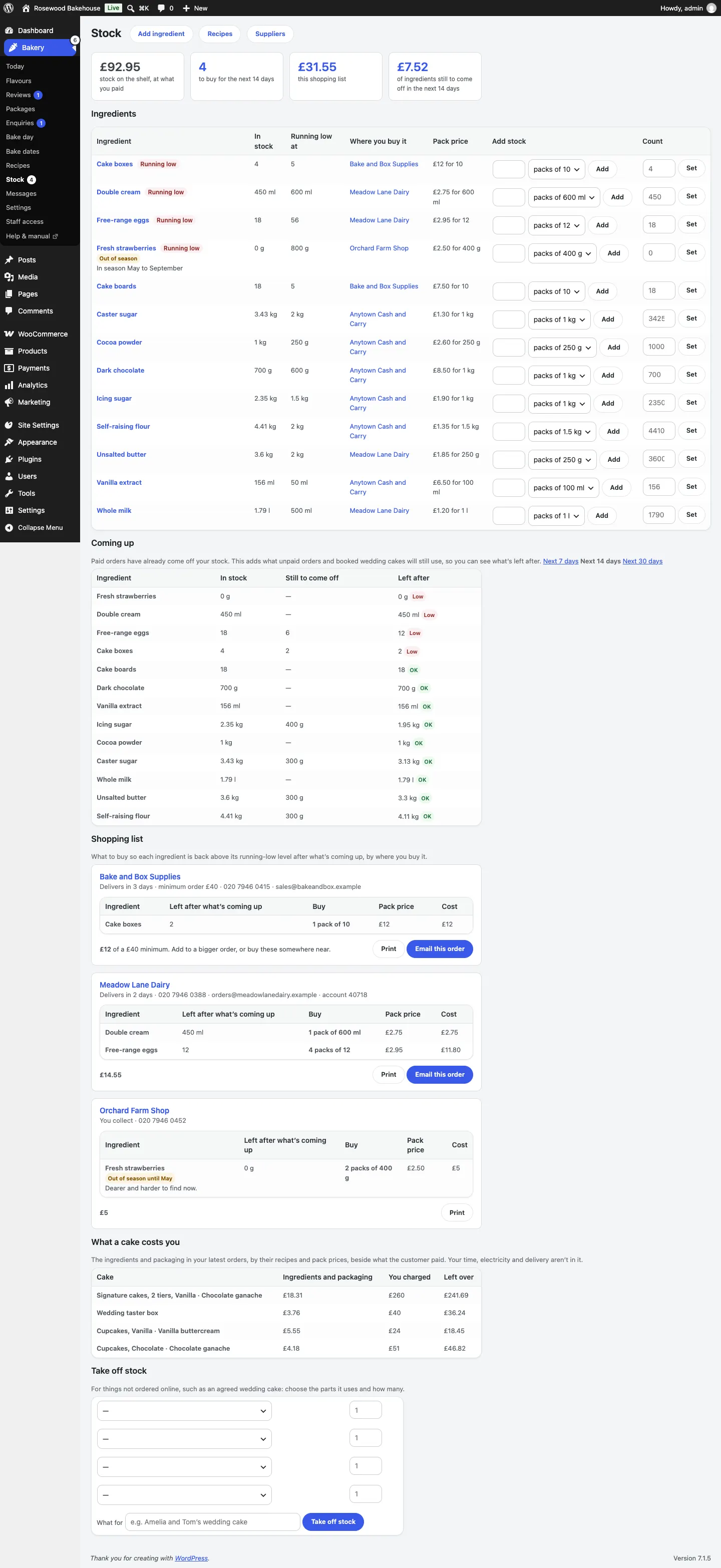
With ingredient stock, each paid order takes the eggs, flour, butter and boxes it uses off your stock. A cancelled or refunded order puts them back. You get an email when something runs low, and the Stock screen shows what your coming orders still need and what to buy. It needs a Pro or Agency licence.
It works from two things you set once:
- Ingredients: what you buy, how much you have and when it's running low.
- Recipes: how much of each ingredient goes into each part of a cake: a tier of each sponge and each filling, the finish, each extra, and anything every order of a product uses (a board, a box).
The starter content can add twelve everyday ingredients and recipes for the starter flavours, so you only need to change the amounts to your own.
Ingredients
Under Bakery → Stock, press Add ingredient.
- Measured in: grams, millilitres or each (for eggs, boards and boxes).
- In stock now: what you have to start with.
- Running low at: when it reaches this, you're emailed and it's marked Running low.
- Usual pack size: how you buy it, such as 12 eggs or a 1.5 kg bag. It's used for adding stock and for the shopping list.
- Where you buy it (optional): choose a supplier, or type a new name to add one. The shopping list is split by supplier.
- What a pack costs (£) (optional): what you pay for one usual pack. It prices the shopping list and works out what a cake costs you.
- In season (optional): for fruit and anything else that is dearer or hard to find part of the year, choose the months it is in season. Outside them, Stock and Today say it is Out of season. Leave it at All year for everything else.
Every change is kept: open an ingredient to see Recent changes, with the order or reason for each.
Suppliers
Press Suppliers on Bakery → Stock to keep a record for each place you buy from: phone, email, website, your account number with them, whether they deliver or you collect, how many days an order takes, their minimum order and a note.
- A supplier you type into an ingredient's Where you buy it is added here for you, ready to fill in.
- Renaming a supplier takes its ingredients with it.
- The supplier's record lists the ingredients you buy from them.
Recipes
Bakery → Recipes puts every recipe on one page. Each row is a part of a cake, each column an ingredient, and each box how much one uses. Leave a box empty when it isn't used.
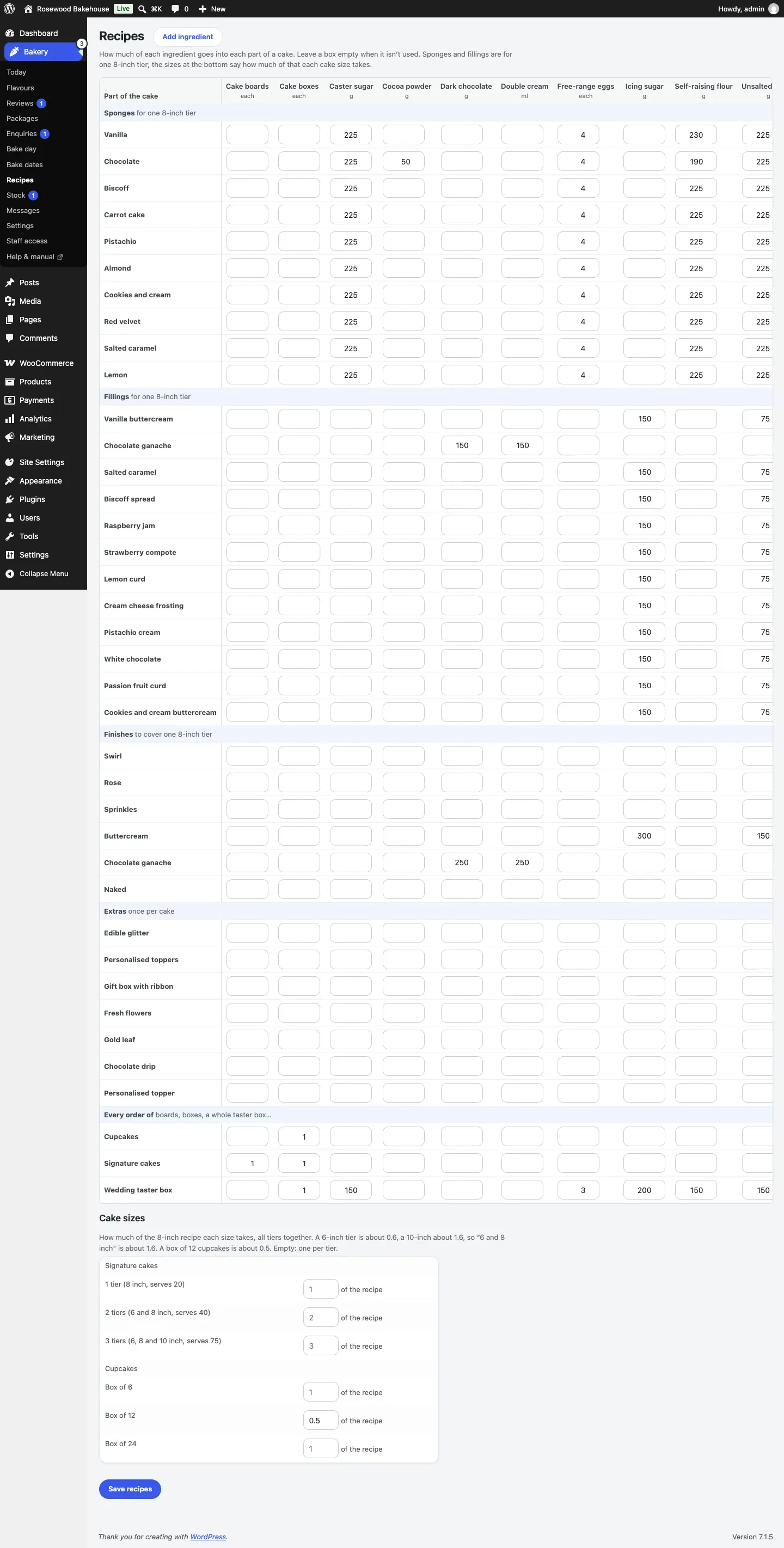
- Sponges and Fillings: for one 8-inch tier.
- Finishes: to cover one 8-inch tier.
- Extras: once per cake.
- Every order of: things every order of a product uses, such as a board and a box, or a whole taster box.
Below the grid, Cake sizes says how much of the 8-inch recipe each of your cake builder sizes takes, all tiers together. A 6-inch tier is about 0.6 and a 10-inch about 1.6, so "6 and 8 inch" is about 1.6; a box of 12 cupcakes is about 0.5 (the starter cupcake boxes come set at 0.25, 0.5 and 1 for 6, 12 and 24). Left empty, each tier counts as one. Press Save recipes.
Each row is saved as a recipe part: the name you pick from under Take off stock and on a wedding enquiry's The cake, for stock.
When stock changes
- An order is paid (processing or completed): its ingredients come off stock, once. The order gets a note, and its Ingredients box shows what it used. Before it's paid the box says what will come off.
- An order is cancelled or refunded after that: they go back on, once. If it's reinstated and paid again, they come off again.
- A wedding cake is booked: open the enquiry and fill in The cake, for stock with the recipe parts it uses, for example 3 × Vanilla sponge, 3 × Raspberry jam filling, 3 × Buttercream finish. It comes off stock when the deposit is paid (or straight away if it's already booked), and goes back if it's no longer booked.
- Something not ordered online: under Take off stock on the Stock screen, choose the recipe parts and how many, say what for, and press Take off stock.
Adding stock and counting
On the Stock screen, each ingredient has two boxes:
- Add stock: type how many packs (or how much) you bought and press Add.
- Count: type what you actually have and press Set, after a stock-take.
Running low
When an ingredient reaches its Running low at level, you get one Running low email listing it, with a button to the shopping list. You won't be emailed about it again until it's been restocked above that level. Ingredients running low are counted on the menu and listed on Today.
Coming up and the shopping list
Coming up adds what unpaid orders and booked wedding cakes in the next 7, 14 or 30 days will still use (paid orders have already come off), and shows what's left after each ingredient: OK, Low or Short.
The Shopping list says what to buy, in your usual packs, so each ingredient is back above its running-low level after what's coming up. For example: "Free-range eggs, 26 left after what's coming up, buy 3 packs of 12".
The list is split by supplier, with a card for each. Where your ingredients have a pack price, each line and each supplier's list shows what it will cost, and the list says when it is under that supplier's minimum order. Print prints one supplier's list. Email this order starts an email to the supplier in your own email program, with the list already written; nothing is sent until you send it. Ingredients with no supplier are listed together at the end.
An ingredient that is out of season is marked on the list, with the month it comes back.
The figures at the top of Bakery → Stock show what the stock on your shelf is worth at what you paid, how many things there are to buy, what the shopping list costs and what is still to come off for orders.
On Today, the next bake date says whether you have enough stock for its orders, and names anything you're short of.
What a cake costs you
Under the shopping list, What a cake costs you takes your latest orders and adds up their ingredients and packaging, by your recipes and pack prices, beside what the customer paid. It counts ingredients and packaging only, not your time, electricity or delivery. Where an ingredient has no pack price yet, the order names it ("Without Vanilla extract: no pack price yet"), so you know the figure leaves it out.