Running your website
Today and staff
The Today screen, the counts on the Bakery menu, and who can use which screens.
On this page
Today
Bakery → Today opens when you sign in. It shows what needs you now; a panel with nothing to show is left out.
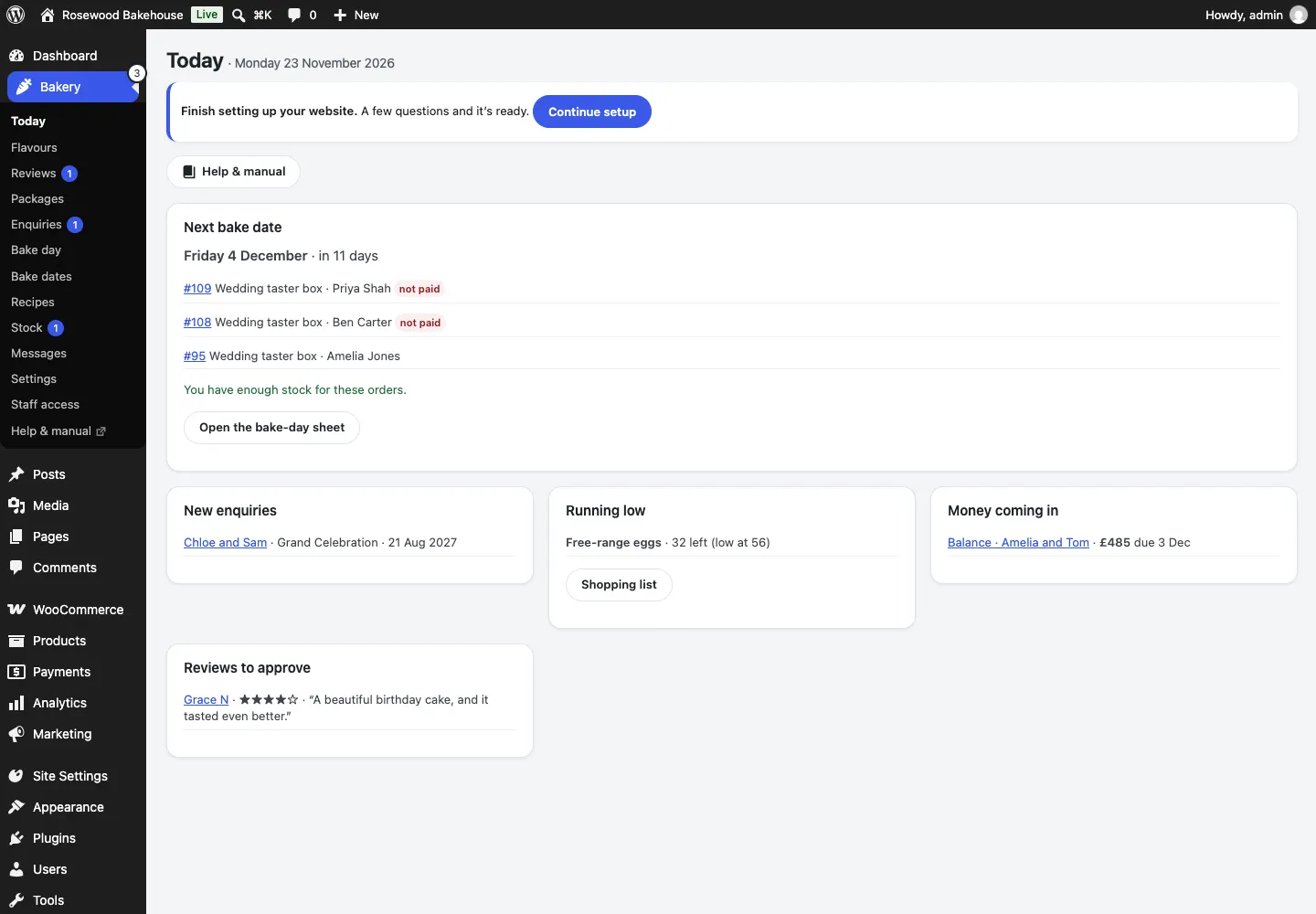
- Next bake date: the date, how many days away it is, and each order for it, marked not paid where it isn't. With ingredient stock (Pro) it says whether you have enough stock or what you're short of, and with Pro there's Open the bake-day sheet. With no dates open it offers Open some dates.
- New enquiries: enquiries you haven't answered yet.
- Couples waiting for a reply (Pro): couples whose last message on My wedding has no reply.
- Running low (Pro): ingredients at or below their running-low level, with a link to the shopping list.
- Out of season (Pro): shown only when an ingredient that is out of season is running low or is needed by orders in the next 30 days, with the month it is back in season.
- Money coming in: deposit and balance links sent but not paid, and booked enquiries whose balance is due within 30 days but whose balance link you haven't sent yet (Balance to send), with the amount and due date.
- Reviews to approve: reviews left on the website, waiting for you to publish them.
The Bakery menu also shows a count beside Enquiries (new ones), Reviews (waiting) and Stock (running low).
The Bakery menu
Orders and your cakes stay under WooCommerce → Orders and Products.
Staff
Give each person their own account under Users → Add New User; please don't share accounts. See the shared chapter Staff accounts and signing in.
- Administrators can use everything.
- Shop managers (a WooCommerce role) can use every Bakery screen: Today, Enquiries, Bake dates, Bake day, Recipes and Stock, as well as orders and products. It's the right role for someone who runs the orders.
- Editors can change flavours, reviews, packages and pages, but not enquiries, dates or stock.
To let another role run the bakery, open Site Settings → Staff access and tick Run the bakery (orders, enquiries and wedding bookings, bake dates, the bake-day sheet, stock and recipes) or Add and change cakes (the cakes in the shop and the cake builder's choices, but not deleting them) for that role. Shop managers have both to start with.