Running your website
Running the website week by week
The weekly routine: the Today screen, red numbers in the menu, welcoming visitors, prayer, sermons and events, site stats, and good habits.
On this page
Once your website is set up, it mostly runs itself: sermons arrive from YouTube, repeating events roll forward and service times update the Plan a visit dates. What's left is people: welcoming visitors, praying for requests and answering messages. This chapter is the routine that keeps it all fresh.
Start each week with Today
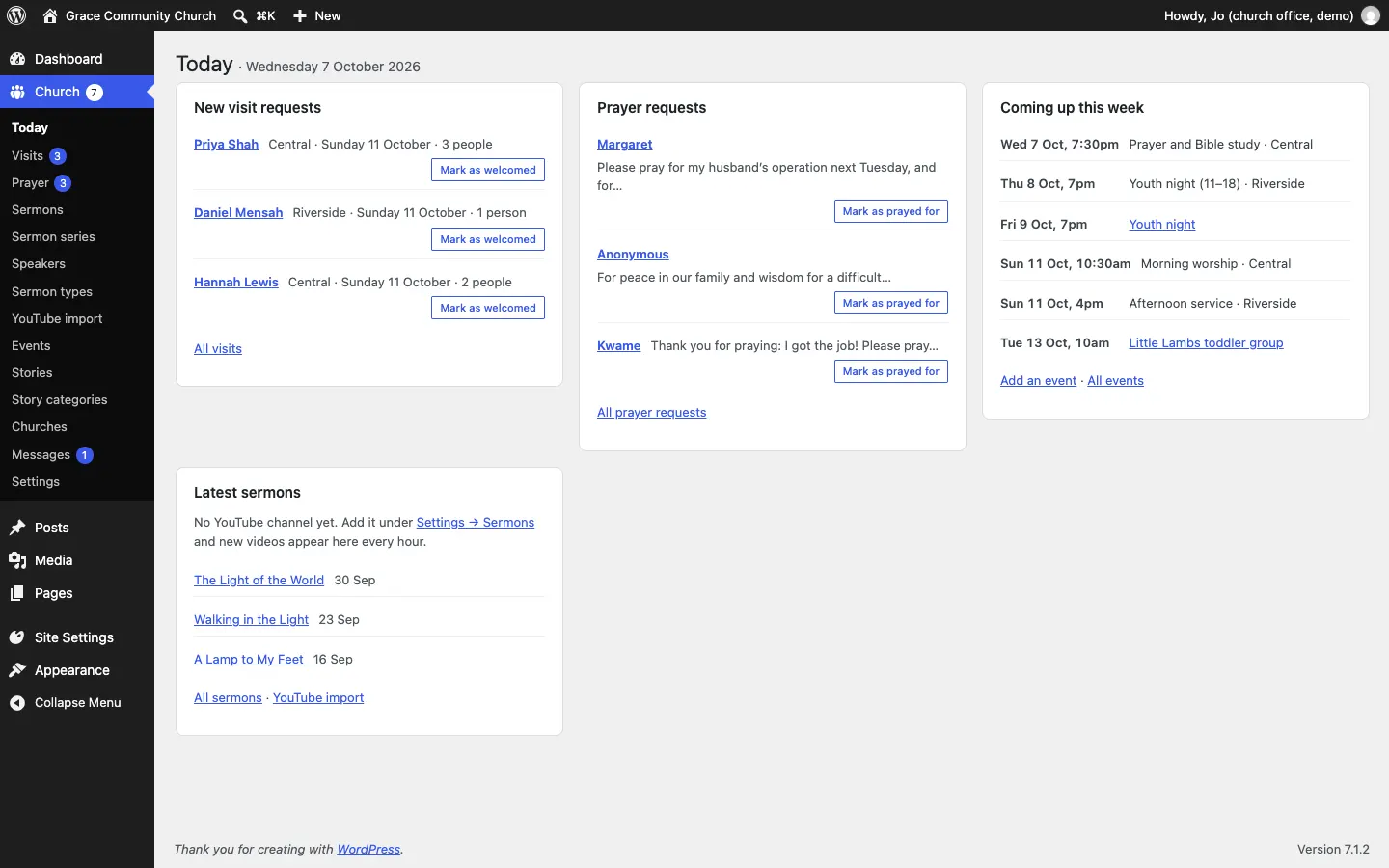
After you sign in you go straight to Church → Today. It shows what needs attention:
- New visit requests: who's coming, to which church and on which Sunday, with Mark as welcomed.
- Prayer requests (only for people allowed to read them), with Mark as prayed for.
- Coming up this week: services and events, with Add an event and All events.
- Latest sermons from YouTube, with All sermons and YouTube import.
Administrators also see a reminder when old visit or prayer records are due for review.
The red numbers
The numbers in circles in the left-hand menu show how many things are waiting:
| Beside | Means |
|---|---|
| Church | Everything waiting, added together |
| Visits | New visit requests not yet marked welcomed |
| Prayer | New prayer requests not yet marked prayed for |
| Messages | New messages from the contact form |
| YouTube import | The last check of your channel failed |
| Events | Your church app couldn't be reached (Pro) |
They go away as you deal with each item.
A weekly checklist
Early in the week
- Open Church → Today.
- Reply to each new visit request (Church → Visits → Details → Email them) and make sure someone will meet them. See Plan a visit.
- Pass prayer requests to the prayer team and click Mark as prayed for. See Prayer requests.
- Answer any Messages.
After Sunday
- Click Mark as welcomed for the visitors who came.
- Check the new sermon has arrived under Church → Sermons. Add the Series and Bible passage. See Sermons.
- If it hasn't arrived yet, click Import now on Church → Settings → Sermons.
When something's coming up
- Add the event under Church → Events → Add an event, with a photo. See Events.
- Put a news post under Posts → Add Post if it needs more words. See Pages and content.
- Write up what happened afterwards as a community story. See Community stories.
Every few months
- Check service times, phone numbers and addresses under Church → Churches and Church → Settings.
- Replace sample or old photos with new ones.
- An administrator looks at Visits → Due for review and Prayer → Due for review and deletes what isn't needed.
- Check the website is up to date and backed up. See Backups and updates.
Site stats (Pro)
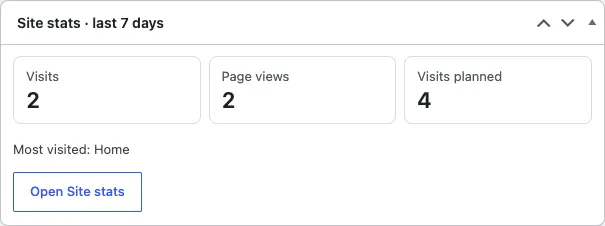
The Dashboard has a Site stats · last 7 days box: visits, page views, visits planned and the most visited page. Click Open Site stats for more.
Where to change things
| To change… | Go to |
|---|---|
| Service and meeting times | Church → Churches → the church → Meeting times |
| A church's address, phone, email or pastor | Church → Churches → the church → Church details |
| The main phone, email and address | Church → Settings → Contact |
| Who gets the emails | Church → Settings → Email |
| Your YouTube channel | Church → Settings → Sermons |
| Giving links and bank details | Church → Settings → Giving |
| The logo and church name | Church → Settings → Business |
| The look and colours | Site Settings → Design & colours |
| A page's words and photos | Pages → the page |
| Who can do what | Church → Staff access |
The full list of settings is in Church settings, tab by tab.
Good habits
- Reply to visit requests within a day or two and mark them welcomed.
- Check Church → Today at the start of each week.
- Never type passwords, bank card numbers or sensitive pastoral notes into the website.
- Use your own account; don't share one.
- If an email doesn't seem to arrive, look at Church → Settings → Email → Email log (Pro), or use Send a test email.
- If something looks wrong, take a screenshot and send it to whoever looks after your website. See Troubleshooting and support.