User manual
Gradespace Tutor: the manual
What the Tutor kit does for a tuition centre or an independent tutor, what Starter and Pro include, and every chapter of this manual in reading order.
On this page
Gradespace Tutor turns a WordPress website into the online office of a tuition centre, or of a tutor working alone. Families find a tutor by subject and level, book a trial lesson at a real free time in that tutor's week, and you confirm it. Every email about a child's lessons goes to the parent or guardian. With Pro you also run small groups with a waiting list, a weekly timetable that follows your term dates, a register and lesson packages.
The kit comes in three parts:
- Gradespace Core (free): the back office every kit shares. Settings in plain words, the Today screen, staff access, branded emails, the setup wizard, your licence and updates.
- The Gradespace Tutor plugin: everything in this manual. A plugin is an add-on for WordPress.
- The Gradespace Tutor theme: the design. You can change it at any time without losing anything.
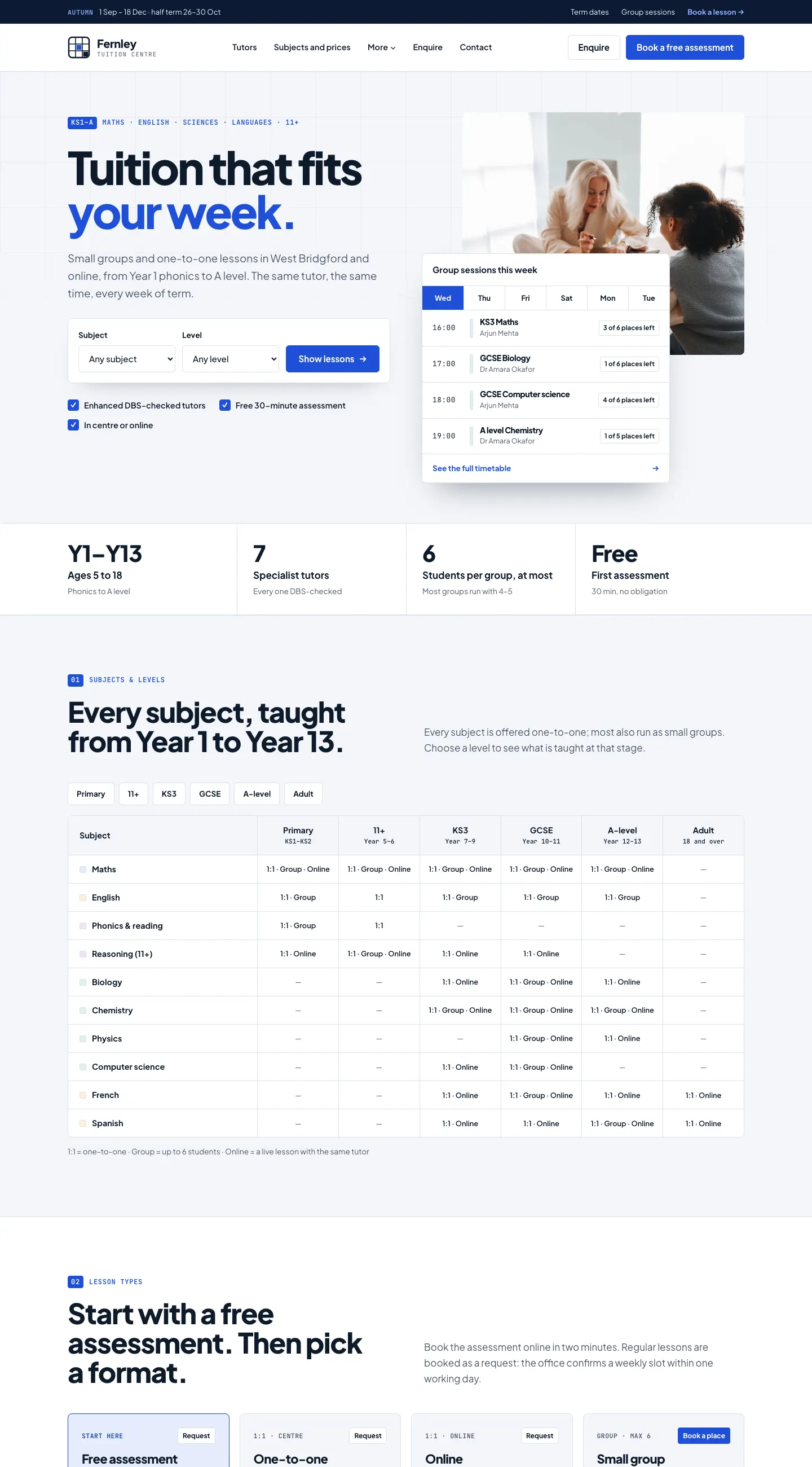
All the examples and screenshots come from the public demo at tutor.gskits.co.uk, a sample centre called Fernley in West Bridgford, Nottingham, with seven tutors.
What it does
- Tutors. A public page for each tutor, with their photo, subjects, levels, exam boards, online or in person, rate, qualifications, their real free times and a short DBS line ("DBS certificate seen by us"). Tutors can sign in and keep their own profile and hours up to date.
- Subjects, levels and exam boards. Lists you add to once; tutors tick the ones they teach. The website builds a subjects × levels table from them.
- Lesson types. A trial lesson (free or paid), one-to-one lessons, online lessons and group sessions, each with its length, price and where it happens.
- Online booking. Four short steps: the lesson, a tutor (or Any tutor), a day, then a time and the family's details. By default each booking is a request that you confirm.
- Children and parents. For a child, the form asks for the parent or guardian's details, and every email goes to them, never to the child.
- Students. A record per student with the parent's details, their lessons, packages and notes for tutors. Records come up for review; nothing is deleted automatically.
- The parent enquiry form, for families who would rather ask first.
- Pro: group sessions with places and a waiting list, the weekly timetable and term dates, weekly lessons booked until the end of term, the attendance register, lesson packages, payment before lessons and private calendar feeds.
Starter and Pro
The kit runs in Starter mode until you add a Pro licence key. Features marked (Pro) in this manual need a Pro or Agency licence. Screens for Pro features stay in the menu with a Pro badge and show what an upgrade adds. Nothing is deleted if a licence lapses.
| Feature | Starter | Pro or Agency |
|---|---|---|
| Tutor pages that tutors keep up to date, the DBS line | Yes | Yes |
| Subjects, levels and exam boards | Yes | Yes |
| Trial and one-to-one lesson types | Yes | Yes |
| Online booking (request or instant), each tutor's hours, gaps, reminders, move and cancel links | Yes | Yes |
| Students with parent or guardian details, under-18 rules, Due for review | Yes | Yes |
| The parent enquiry form | Yes | Yes |
| Today, Lessons, Timetable, Add lesson, the Tutor and Office roles | Yes | Yes |
| Group sessions with places and a waiting list | No | Yes |
| Weekly timetable, term dates, term-time-only booking, "repeat weekly until the end of term" | No | Yes |
| Attendance register and spreadsheet download | No | Yes |
| Lesson packages, bought online or sold at the desk | No | Yes |
| Private calendar feeds | No | Yes |
| Payment before lessons (a deposit or the full price), gift vouchers | No | Yes, with online payments set up |
How this manual is organised
Read the shared chapters first if you are installing the kit yourself. They are the same for every Gradespace kit.
Getting started (shared chapters)
- About the shared chapters
- Buying and your licence
- Before you install
- Installing
- The setup wizard in general
Getting started (this kit)
Running the centre (this kit)
- Subjects, levels and lesson types
- Tutors
- Online booking: the family's side
- Lessons and the timetable: the office's side
- Students and parents
- Enquiries and messages
- Group sessions (Pro)
- The weekly timetable and term dates (Pro)
- The attendance register (Pro)
- Lesson packages and payments (Pro)
- Daily running and settings
Looking after the website (shared chapters)
Every chapter of this manual
Buying and installing
- Buying and your licenceSharedThe Starter, Pro and Agency tiers, buying a kit, the licence key email, your licences page on thegradespace.com, and moving or upgrading a licence.
- Before you installSharedWhat your website and hosting need for a Gradespace kit, how to check them, and why to take a backup and use a test copy first.
- Installing your kitSharedInstalling Gradespace Core, then your kit's plugin, then your kit's theme from their .zip files, adding your licence key, and how updates arrive.
Setting up
- The setup wizardSharedHow the setup wizard works in every kit: each step, the starter pages and menu, sample photos, legal pages, and how to run it again.
- The setup wizardThe step-by-step screen that gets a new tutoring website ready: what you teach, your tutors, lessons and prices, opening hours, online booking, and the starter pages, sample tutors and photos.
- Your look: design, colours, logo, menus and footerSharedChoosing a design and colour palette in Site Settings → Design & colours, previewing it, keeping the menu at the top when scrolling, adding your logo, and changing the menu and the footer.
- Designs, pages and menusThe four Tutor designs and their seven colour palettes, how to preview and choose one, and the pages and menu the kit makes for you.
- Pages, posts and picturesSharedEditing pages in the WordPress block editor, starting a page from your kit's ready-made layouts and sections, writing blog posts, and adding and replacing pictures in the media library.
Running your website
- Subjects, levels and lesson typesThe lists of subjects, levels and exam boards your tutors choose from, and the lesson types families book: trial lessons, one-to-one, online and group sessions, with their length, price and deposit.
- TutorsAdding a tutor, their public page, teaching hours and days off, the office-only fields (online booking, DBS certificate, email, sign-in), and what a tutor sees when they sign in.
- Online booking: the family's sideWhat a parent or adult student sees when they book a lesson on your website: the four steps, booking for a child, trial lessons, repeating weekly until the end of term, and moving or cancelling with the link in their email.
- Lessons and the timetable: the office's sideConfirming or declining online requests, booking lessons taken by phone or in person, changing, moving and cancelling a lesson, the Lessons list, the Timetable and lessons booked together.
- Students and parentsThe student record with the parent or guardian's details, the under-18 rules, notes for tutors, packages sold at the desk, reviewing old records and answering a family's request for their data.
- Enquiries and messagesThe parent enquiry form for families who'd rather ask first, the contact form, and how to read and answer both under Messages.
- Group sessions (Pro)Small-group sessions with a number of places and a waiting list: adding a one-off session, how families book a place or join the waiting list, and managing places, the waiting list and cancellations.
- The weekly timetable and term dates (Pro)Your term dates and holidays, regular weekly lessons and groups that are made automatically for the weeks ahead, clashes, stopping a slot, and term-time-only booking.
- The attendance register (Pro)Taking the register for a day's lessons and groups (present, late, absent, excused, with a note), what it changes on one-to-one lessons, and downloading the register as a spreadsheet.
- Lesson packages and payments (Pro)Blocks of lessons (for example 10 one-to-one lessons) bought online or sold at the desk and counted down as lessons are booked, payment before lessons, the Payments screen and gift vouchers.
- Daily running and settingsThe daily and weekly routine for the office, the Today screen and the red badges, and a reference to every Tutoring setting: lessons, opening hours, terms, records, email and staff access.
Looking after your website
- Staff accounts and signing inSharedGiving each member of staff their own account, the staff roles each kit comes with, choosing what each role can do (Pro), and the staff sign-in page.
- Privacy, cookies and emailsSharedThe cookie banner and cookie settings, your starter terms, privacy and cookie policies, requests for people's data, the website's branded emails, test emails and the email log (Pro).
- Backups and updatesSharedWhat to back up and how often, and how to install updates to Gradespace Core, your kit's plugin and its theme safely.
- Troubleshooting and supportSharedFixes for the problems people meet most often: licence messages, installing, the setup wizard, pages not found, emails, signing in, the design and the cookie banner, and how to get help.
Bought this kit? The whole manual is also a PDF (version 1.0.1) to download or print, on My licences.