User manual
Gradespace Driving: the manual
What the Driving kit does for a driving school or an independent instructor, what Starter and Pro include, and every chapter of this manual in reading order.
On this page
Gradespace Driving turns a WordPress website into the online office of a driving school, or of an independent instructor. Learners type the postcode they want to be picked up from, choose manual or automatic, see which of your instructors covers them and book a lesson at a real free time in that instructor's diary. You confirm the lesson, the learner gets the pickup details and a reminder the day before, and the instructor writes a note after the lesson.
The kit comes in three parts:
- Gradespace Core (free): the back office every kit shares. Settings in plain words, the Today screen, staff access, branded emails, the setup wizard, your licence and updates.
- The Gradespace Driving plugin: everything in this manual. A plugin is an add-on for WordPress.
- The Gradespace Driving theme: the design. You can change it at any time without losing anything.
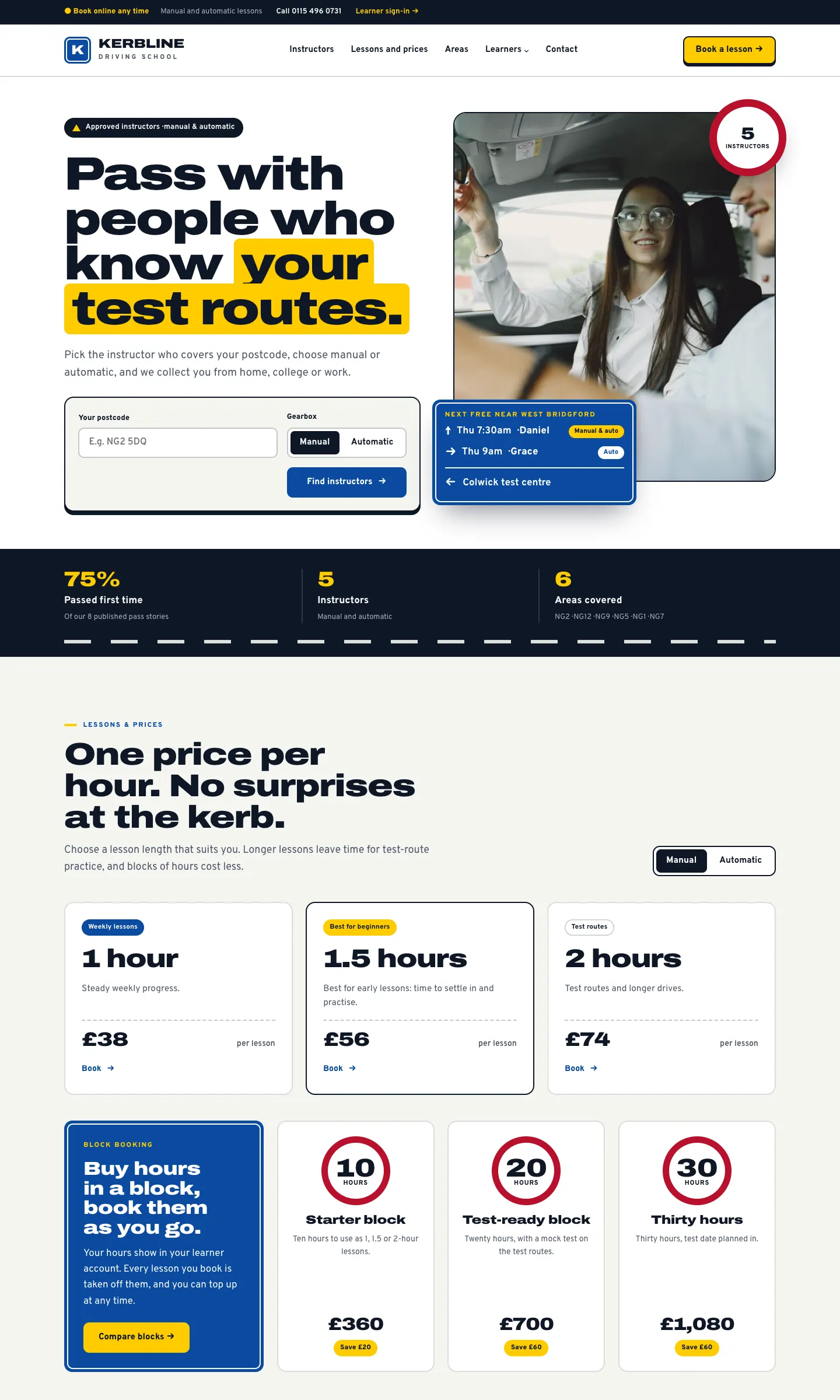
All the examples and screenshots come from the public demo at driving.gskits.co.uk, a sample school called Kerbline with five instructors around Nottingham.
What it does
- Areas covered and the postcode check. You list the postcode districts each area covers. Learners check their postcode and see who teaches there. Postcodes nobody covers get an Ask us form.
- Instructors. A public page for each instructor, with their car, gearbox, languages, areas and a Book button. Instructors can sign in to see their own diary, set their hours and write lesson notes.
- Lessons and prices. A first lesson (free or paid) and 1, 1.5 and 2-hour lessons, each with a manual and an automatic price.
- Online booking. Five short steps (a lesson's own page from the email link lets learners move it, change the pickup or cancel), with the pickup and drop-off, the learner's date of birth and, for under-18s, a parent or guardian.
- The diary. A day, week or month view with a column for each instructor.
- Learners and parents. A record for each learner with the essentials only. The website never asks for, or keeps, a driving licence number.
- Test dates and pass stories. Every practical test in one list, and pass stories published only with the learner's agreement.
- Theory resources. Your own guides, plus links to the official GOV.UK pages.
Starter and Pro
The kit runs in Starter mode until you add a Pro licence key. Features marked (Pro) in this manual need a Pro or Agency licence.
| Feature | Starter | Pro or Agency |
|---|---|---|
| Areas covered, postcode check and Ask us form | Yes | Yes |
| Instructor pages | Yes | Yes |
| Instructors offered for online booking | The first three (by their Order number) | As many as you like |
| Online booking, requests, reminders, move and cancel links | Yes | Yes |
| Booking several lessons at once | Yes | Yes |
| The diary, Add lesson, Test dates | Yes | Yes |
| Learner records, parents, review list | Yes | Yes |
| Pass stories and theory resources | Yes | Yes |
| Travel time between areas | No | Yes |
| Calendar feed for instructors and the office | No | Yes |
| The Office role (staff who run the diary without being administrators) | No | Yes |
| Block bookings and courses (Packages), block hours | No | Yes |
| The learner account, with progress scores and the test tracker | No | Yes |
| Taking payment before a lesson (a deposit or the full price) | No | Yes, with online payments set up |
How this manual is organised
Read the shared chapters first if you are installing the kit yourself. They are the same for every Gradespace kit.
Getting started (shared chapters)
- About the shared chapters
- Buying and your licence
- Before you install
- Installing
- The setup wizard in general
Getting started (this kit)
- Quick start: from buying to your first booked lesson
- The Driving setup wizard
- Designs, pages and menus
Running the school (this kit)
- Areas covered and the postcode check
- Instructors
- Lesson types and prices
- Online booking: the learner's side
- Lessons and the diary: the office's side
- Learners and parents
- Test dates and pass stories
- Block bookings and courses (Pro)
- The learner account (Pro)
- Payments and gift vouchers
- Messages, enquiries and theory resources
- Settings
- Daily running
Looking after the website (shared chapters)
Every chapter of this manual
Buying and installing
- Buying and your licenceSharedThe Starter, Pro and Agency tiers, buying a kit, the licence key email, your licences page on thegradespace.com, and moving or upgrading a licence.
- Before you installSharedWhat your website and hosting need for a Gradespace kit, how to check them, and why to take a backup and use a test copy first.
- Installing your kitSharedInstalling Gradespace Core, then your kit's plugin, then your kit's theme from their .zip files, adding your licence key, and how updates arrive.
Setting up
- The setup wizardSharedHow the setup wizard works in every kit: each step, the starter pages and menu, sample photos, legal pages, and how to run it again.
- The setup wizardThe step-by-step screen that gets a new driving school website ready: the areas you cover, your instructors, lessons and prices, hours, online booking, and the starter pages, theory resources, samples and photos.
- Your look: design, colours, logo, menus and footerSharedChoosing a design and colour palette in Site Settings → Design & colours, previewing it, keeping the menu at the top when scrolling, adding your logo, and changing the menu and the footer.
- Designs, pages and menusThe three Driving designs (Signal, Glide and Neighbour) and their colour palettes, the pages and menu the kit makes, and how each looks on a computer and a phone.
- Pages, posts and picturesSharedEditing pages in the WordPress block editor, starting a page from your kit's ready-made layouts and sections, writing blog posts, and adding and replacing pictures in the media library.
Running your website
- Areas covered and the postcode checkHow to set up the towns and postcode districts you pick up from, how learners check their postcode, and what happens when nobody covers it.
- InstructorsHow to add instructors and their public pages, the areas and gearbox they teach, their hours and days off, the badge check, their own sign-in and diary, and calendar feeds.
- Lesson types and pricesHow to set up the first lesson and your 1, 1.5 and 2-hour lessons, with manual and automatic prices, and how to ask for a deposit when learners book online.
- Online booking: the learner's sideThe five booking steps a learner goes through on your website, the pickup and drop-off, learners under 18, booking several lessons at once, and how learners move, change the pickup or cancel.
- Lessons and the diary: the office's sideHow the office confirms or declines online requests, books phone and in-person lessons, moves and cancels lessons, marks them taught, writes the lesson note, and uses the day, week and month diary.
- Learners and parentsThe learner record: what it keeps (and never keeps), parents and guardians for under-18s, staff notes, lessons and notes, progress scores, the review list and requests to see or delete data.
- Test dates and pass storiesThe Test dates screen with every practical test and theory passes running out, how to record a result, and how to publish a pass story only with the learner's agreement.
- Block bookings and courses (Pro)How to set up blocks of hours and weekly, semi-intensive and intensive courses, how learners buy them online, how to sell one in person, and how block hours are used lesson by lesson.
- The learner account (Pro)What learners see when they sign in: their next lessons, the test tracker, block hours, progress, lesson notes, theory guides, their parent's contact and their data, and how they first get in.
- Payments and gift vouchersHow to connect Stripe or WooCommerce so learners can pay deposits and buy block hours online, the Payments screen, recording payments made in person, and gift vouchers.
- Messages, enquiries and theory resourcesWhere Ask us enquiries and contact form messages arrive and how to answer them, and how to write theory test guides and add links to the official GOV.UK pages.
- SettingsEvery tab under Driving school → Settings explained: Business, Contact, Email, Lessons, Opening hours, Learners, Records, Privacy and Payments.
- Daily runningThe office's daily and weekly routine with the Today screen and the red badges, what instructors do after each lesson, and a quick reference of where everything is.
Looking after your website
- Staff accounts and signing inSharedGiving each member of staff their own account, the staff roles each kit comes with, choosing what each role can do (Pro), and the staff sign-in page.
- Privacy, cookies and emailsSharedThe cookie banner and cookie settings, your starter terms, privacy and cookie policies, requests for people's data, the website's branded emails, test emails and the email log (Pro).
- Backups and updatesSharedWhat to back up and how often, and how to install updates to Gradespace Core, your kit's plugin and its theme safely.
- Troubleshooting and supportSharedFixes for the problems people meet most often: licence messages, installing, the setup wizard, pages not found, emails, signing in, the design and the cookie banner, and how to get help.
Bought this kit? The whole manual is also a PDF (version 1.0.1) to download or print, on My licences.